> ## Documentation Index
> Fetch the complete documentation index at: https://sensible.mintlify.site/llms.txt
> Use this file to discover all available pages before exploring further.
# Fixed table
Extracts tables with a fixed number of columns and returns their collated column contents. Anchor either on the table title or on a table column heading.
Use the Fixed Table method for tables in the same document type that always have the same column layout (same headings in the same order, same number of columns).
For alternatives to this method, see [Choosing a table method](/senseml-reference/concepts/table-methods).
[**Parameters**](/senseml-reference/methods/fixed-table#parameters)\
[**Examples**](/senseml-reference/methods/fixed-table#examples)\
[**Notes**](/senseml-reference/methods/fixed-table#notes)
## Parameters
**Note:** For the full list of parameters available for this method, see [Global parameters for methods](/senseml-reference/field-query-object/method#global-parameters-for-methods). The following table shows parameters most relevant to or specific to this method.
| key | value | description |
| ------------------------------- | ---------------------------------------------------------------------------------------------------- | ----------------------------------------------------------------------------------------------------------------------------------------------------------------------------------------------------------------------------------------------------------------------------------------------------------------------------------------------------------------------------------------------------------------------------------------------------------------------------------------------------------------------------------------------------------------------------------------------------------------------------------------------------------------------------------------------------------------------------- |
| id (**required**) | fixedTable | When you specify this, you must also specify "type": "table" in the field's parameters. See the Stop parameter for details about how Sensible recognizes a table. |
| columnCount (**required**) | integer | The number of columns the tables must have. |
| columns (**required**) | array | An array of objects with the following parameters:
-id (**required**): The ID for the column in the extraction output
- index (**required**): The zero-based column index
-type : The table cell's type. For more information, see [Types](/senseml-reference/field-query-object/types)
-isRequired (default: false): If true, Sensible omits a row if its cell is empty in this column, or if the contents don't match the value you specify in this column's Type parameter. If false, Sensible returns nulls for empty cells in the row. Note that if you set this parameter to true for one column, Sensible omits the row for *all* columns, even if the row had content under other columns. |
| stop | [Match object](/senseml-reference/field-query-object/match) or array of Match objects. default: none | (**Recommended**) Stops table recognition at the matched line. Otherwise, Sensible searches all pages for tables, which can impact performance.When you specify a stop, Sensible uses an Amazon Web Service provider to perform table recognition. When you omit a stop, Sensible uses a Microsoft OCR provider.When you specify a stop, Sensible supports:
- merged cells in tables. Sensible populates "empty" spanned cells with the spanned value. For an example, see [Merged cell example](/senseml-reference/methods/fixed-table#example-merged-cells).
- checkboxes in cells. Returns checkbox selection status as \[true] or \[false]. |
| startOnRow | integer. default: 0 | Zero-indexed row number at which to start table extraction. For example, use this to exclude column headings from the output. As a stricter alternative, set the Is Required parameter on a column and set a type on the column (see example in Examples section). |
| detectTableStructureOnly | boolean. default: false | Set this parameter to true to troubleshoot optional character recognition (OCR) in a table. If true, Sensible bypasses the text output by the table recognition OCR provider. Sensible instead recognizes the table's text using the [OCR engine](/senseml-reference/document-type-settings/ocr-engine) specified by your document type, or by using text embedded in the document file if present. For an example, see [Example: Troubleshoot Table OCR](/senseml-reference/methods/fixed-table#example-troubleshoot-table-ocr).If "detectTableStructureOnly": true causes incorrect [line sorting](/senseml-reference/concepts/lines#line-sorting), set annotateSuperscriptAndSubscript": true to correct the line sorting. |
| annotateSuperscriptAndSubscript | boolean. default: false | Set to true only if the Detect Table Structure Only parameter is set to true. When true:
- Sensible annotates subscript and superscript text in the table with \[^...] and \[\_...], respectively. This parameter doesn't support annotating text in multi-line cells. |
## Examples
The following example shows extracting two columns using the Fixed Table method.
* In order to omit column headings, the config specifies `"type": "number"` and `"isRequired": true` for the column `col4_rank_last_month` . You can also use `"startOnRow":1` to omit headings.
* To improve performance, the config specifies a Stop parameter.
**Config**
```JSON JSON
{
"fields": [
{
"id": "agile_risks_table",
"anchor": "agile software",
"type": "table",
"method": {
"id": "fixedTable",
"columnCount": 4,
"columns": [
{
"id": "col1_risk_description",
"type": "string",
"index": 0
},
{
"id": "col4_rank_last_month",
"type": "number",
"isRequired": true,
"index": 3
}
],
"stop": {
"type": "startsWith",
"text": "project managers"
}
}
}
]
}
```
**Example document**\
The following image shows the example document used with this example config:

| Example document | [Download link](https://raw.githubusercontent.com/sensible-hq/sensible-docs/main/readme-sync/assets/v0/pdfs/fixed%5Ftable.pdf) |
| ---------------- | ------------------------------------------------------------------------------------------------------------------------------ |
**Output**
```JSON JSON
{
"agile_risks_table": {
"columns": [
{
"id": "col1_risk_description",
"values": [
{
"value": "Poor task point estimation",
"type": "string"
},
{
"value": "Poor epic scope definition",
"type": "string"
},
{
"value": "Inadequate scrum master training",
"type": "string"
}
]
},
{
"id": "col4_rank_last_month",
"values": [
{
"source": "2",
"value": 2,
"type": "number"
},
{
"source": "1",
"value": 1,
"type": "number"
},
{
"source": "3",
"value": 3,
"type": "number"
}
]
}
]
}
}
```
### Example: Merged cells
The following example shows using the Stop parameter to improve output for merged cells:
**Config**
```JSON JSON
{
"fields": [
{
"id": "test_merged_cells",
"anchor": "start of table",
"type": "table",
"method": {
"id": "fixedTable",
"columnCount": 3,
"columns": [
{
"id": "class",
"type": "string",
"index": 0
},
{
"id": "student",
"index": 1
},
{
"id": "grades",
"index": 2
}
],
"stop": {
"type": "startsWith",
"text": "end of table"
}
}
}
]
}
```
**Example document**\
The following image shows the example document used with this example config:

| Example document | [Download link](https://raw.githubusercontent.com/sensible-hq/sensible-docs/main/readme-sync/assets/v0/pdfs/fixed%5Ftable%5Fmerged%5Fcells.pdf) |
| ---------------- | ----------------------------------------------------------------------------------------------------------------------------------------------- |
**Output**
Without the Stop parameter, Sensible leaves "merged" cells empty:

With the Stop parmeter, Sensible populates "merged" cells:
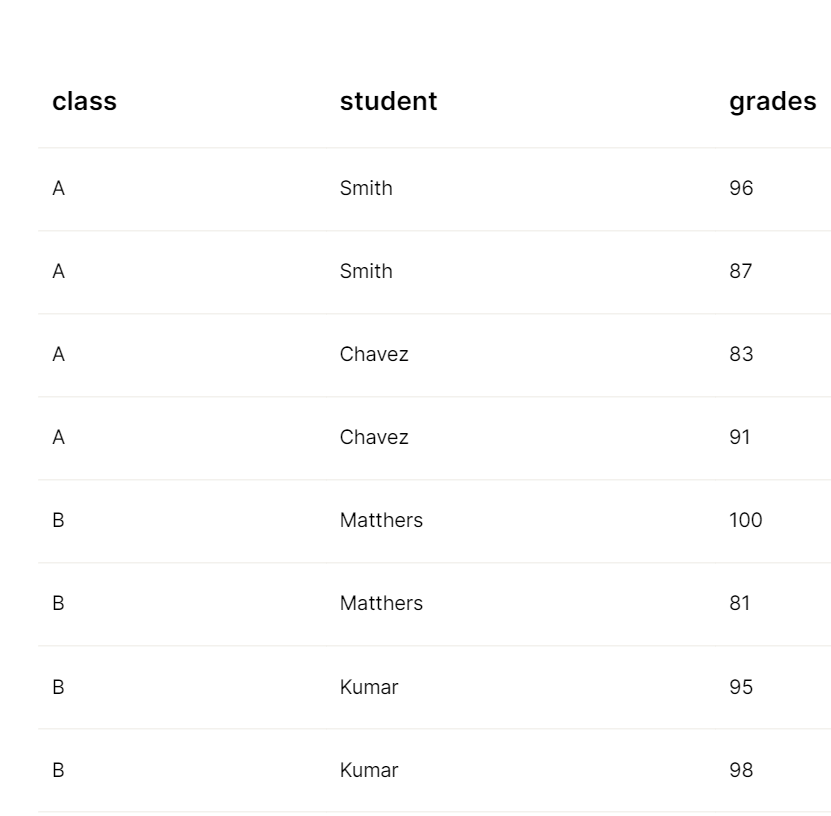
The following JSON shows the "populated" output:
```JSON JSON
{
"test_merged_cells": {
"columns": [
{
"id": "class",
"values": [
{
"value": "Class",
"type": "string"
},
{
"value": "A",
"type": "string"
},
{
"value": "A",
"type": "string"
},
{
"value": "A",
"type": "string"
},
{
"value": "A",
"type": "string"
},
{
"value": "B",
"type": "string"
},
{
"value": "B",
"type": "string"
},
{
"value": "B",
"type": "string"
},
{
"value": "B",
"type": "string"
}
]
},
{
"id": "student",
"values": [
{
"value": "Student",
"type": "string"
},
{
"value": "Smith",
"type": "string"
},
{
"value": "Smith",
"type": "string"
},
{
"value": "Chavez",
"type": "string"
},
{
"value": "Chavez",
"type": "string"
},
{
"value": "Matthers",
"type": "string"
},
{
"value": "Matthers",
"type": "string"
},
{
"value": "Kumar",
"type": "string"
},
{
"value": "Kumar",
"type": "string"
}
]
},
{
"id": "grades",
"values": [
{
"value": "Test grades",
"type": "string"
},
{
"value": "96",
"type": "string"
},
{
"value": "87",
"type": "string"
},
{
"value": "83",
"type": "string"
},
{
"value": "91",
"type": "string"
},
{
"value": "100",
"type": "string"
},
{
"value": "81",
"type": "string"
},
{
"value": "95",
"type": "string"
},
{
"value": "98",
"type": "string"
}
]
}
],
"title": {
"type": "string",
"value": "Start of table"
}
}
}
```
### Example: Troubleshoot table OCR
The following table shows troubleshooting OCR in a table.
**Config**
```JSON JSON
{
"fields": [
{
"id": "symbol_table",
"method": {
"id": "nlpTable",
"description": "table describing comparison symbols",
/* without "detectTableStructureOnly": true,
the OCR engine incorrectly returns < or >
instead of ≤ or ≥ */
"detectTableStructureOnly": true,
/* if "detectTableStructureOnly": true
results in incorrect line sorting,
set the following additional parameter:
"annotateSuperscriptAndSubscript": true,
*/
"columns": [
{
"id": "operator",
"description": "operator",
"type": "string"
},
{
"id": "description",
"description": "description ",
"type": "string"
}
]
}
}
]
}
```
**Example document**\
The following image shows the example document used with this example config:

| Example document | [Download link](https://raw.githubusercontent.com/sensible-hq/sensible-docs/main/readme-sync/assets/v0/pdfs/fixed%5Ftable%5Focr.pdf) |
| ---------------- | ------------------------------------------------------------------------------------------------------------------------------------ |
**Output**
```JSON JSON
{
"symbol_table": {
"columns": [
{
"id": "operator",
"values": [
{
"value": ">",
"type": "string"
},
{
"value": "≥",
"type": "string"
},
{
"value": "<",
"type": "string"
},
{
"value": "≤",
"type": "string"
}
]
},
{
"id": "description",
"values": [
{
"value": "Greater than",
"type": "string"
},
{
"value": "Greater than or equal to",
"type": "string"
},
{
"value": "Less than",
"type": "string"
},
{
"value": "Less than or equal to",
"type": "string"
}
]
}
]
}
}
```
## Notes
For alternatives to this method, see [Choosing a table method](/senseml-reference/concepts/table-methods).