| anchor (required) | Anchor object, or array of Match objects | Anchor parameters have a special meaning in the context of sections, as follows:
start: Ignores anything in the document before this line. if undefined, Sensible searches for the section group starting at the beginning of the document
match (required):
horizontal sections: Specifies both the start of the section group and the repeated starting line of each section. For example, in the preceding image, specify "Claim number". The section starts at the top boundary of this starting line, and the section’s scope includes text to the left of this line. If the start of the section lacks an easy-to-match line, you can use the Require Stop and Offset Y parameters to start the section above or below the line matched by this parameter.
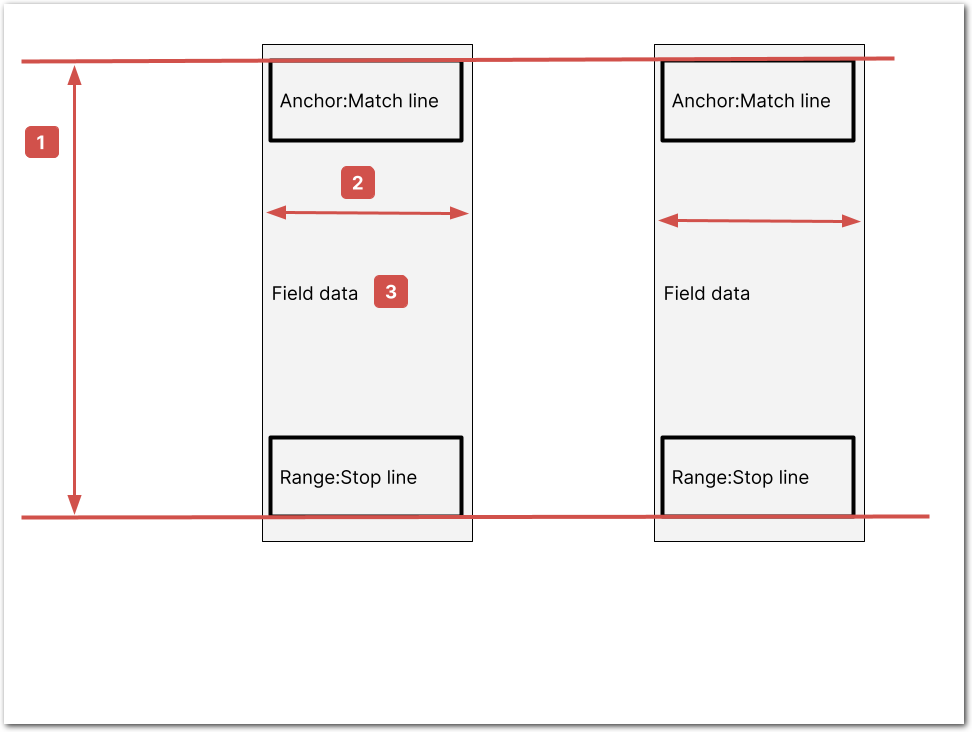
vertical sections: Specifies the start of the section group. By default, Sensible recognizes columns as sections automatically. For more information, see Section nuances.
end: Ignores any anchor matches in the document after this line. For example, to extract solely September claims in the preceding image, specify "October". |
| externalRange | object | horizontal sections: (Advanced) Enables anchoring on text that’s external to the section group range in the sections’ field anchors. For example, use the external range with the Intersection method when sections lack internal anchoring candidates.
The external range defines a vertical range anywhere in the document. You can configure the external range to be static, or to repeat relative to each section.
Contains the following parameters:
anchor (required): An Anchor object. The external range starts at the top boundary of this starting line, and the range’s scope includes text to the left of this line. If the start of the range lacks an easy-to-match line, you can use the Offset Y parameter to start the range above or below the line matched by this parameter.
anchorIsAbsolute: (default: false). If false, Sensible creates dynamic external ranges, each relative to a section start. For example, configure dynamic external ranges if you want to anchor each section’s fields on variably positioned page headings. For more information, see Dynamic external range example. Sensible starts searching for dynamic external ranges in the lines succeeding the start of each section. To search for dynamic external ranges that precede each section, use "reverse":"true" on the external range’s anchor.
If this option is set to true, Sensible creates one static external range in the document, searching from the start of the document. For an example of a static dynamic range, see Static external range example.
stop: (Match object) (required) A Match object defining the end of the external range. Sensible defines the Stop horizontal line by finding the top boundary of the stop line, then applies a default offset of 0.08” down the page.
offsetY: Specifies the number of inches to offset the range’s top boundary from the anchor’s Match parameter.
stopOffsetY: Specifies the number of inches to offset from the Stop parameter.
vertical sections: N/A, external range isn’t allowed for vertical sections. |
| stop | Anchor object, or array of Match objects | horizontal sections: Specifies the repeated end of the section after its anchor. For example, if you specify "Date of claim", then each section stops at a horizontal line below the bottom boundary of the stop line “Date of claim” (plus any offset you specify).
Sensible defines the Stop horizontal line by finding the top boundary of the stop line if found, or the top boundary of the next section’s starting line, then applies a default offset of 0.08” down or up the page, respectively.
If you don’t specify this parameter, each section stops at the top boundary of the next section’s starting line (plus any offset). In this case, the last section in the group continues to the end of the document.
vertical sections: Specifies the end of the section group, and ignores lines that span multiple columns. If not specified, Sensible ends the section group at the first line that spans multiple columns. If the spanning lines occur mid-column, you can also configure the Line Filters parameter.
For more information, see Section nuances. |
| requireStop | Boolean. default: false | horizontal sections: If true, the Stop parameter is required, and the section ends when it matches the Stop parameter, instead of the default behavior of ending at the next starting line specified in the anchor’s Match parameter.
Note: Configure this parameter for horizontal sections when the starting line repeats in the section, to avoid ending the section before it completes. You don’t need to configure this parameter if multiple starting line matches lie on one horizontal line in the section. In such a case, Sensible ignores any zero-height sections generated by this horizontal line’s matches. For more information, see Multiple anchors in section.
vertical sections: N/A, not allowed for vertical sections. |
| offsetY | number in inches | Specifies an offset from the anchor Match parameter. Positive values offset down the page, negative values offset up the page.
horizontal sections: Specifies the number of inches to offset the section’s top boundary from the anchor Match parameter. By default a section starts at the top boundary of the matched line. If you specify Offset Y, the section starts at that top boundary plus the offset. For example, configure this when the section lacks an easy-to-match first line.
vertical sections: Specifies the number of inches to offset the section group’s top boundary from the anchor Match parameter. For example, configure this when when you want to exclude non-columnar text from a vertical section.
|
| stopOffsetY | number in inches | Specifies the number of inches to offset from the Stop parameter.
horizontal sections: Offsets each section’s stop from the Stop horizontal line.
vertical sections: Offsets the section group’s stop from the Stop horizontal line. |


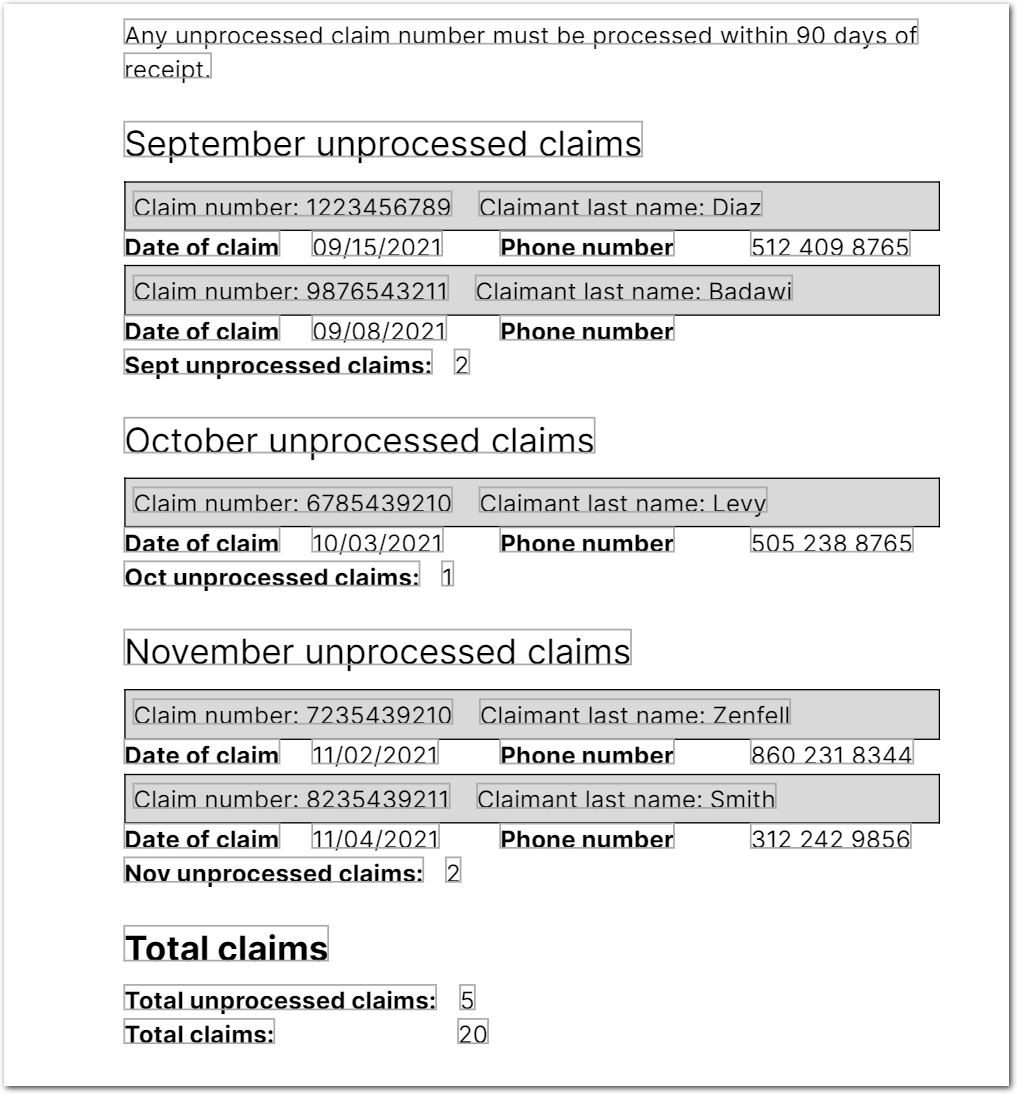 For the preceding example, you can configure Sensible to return an
 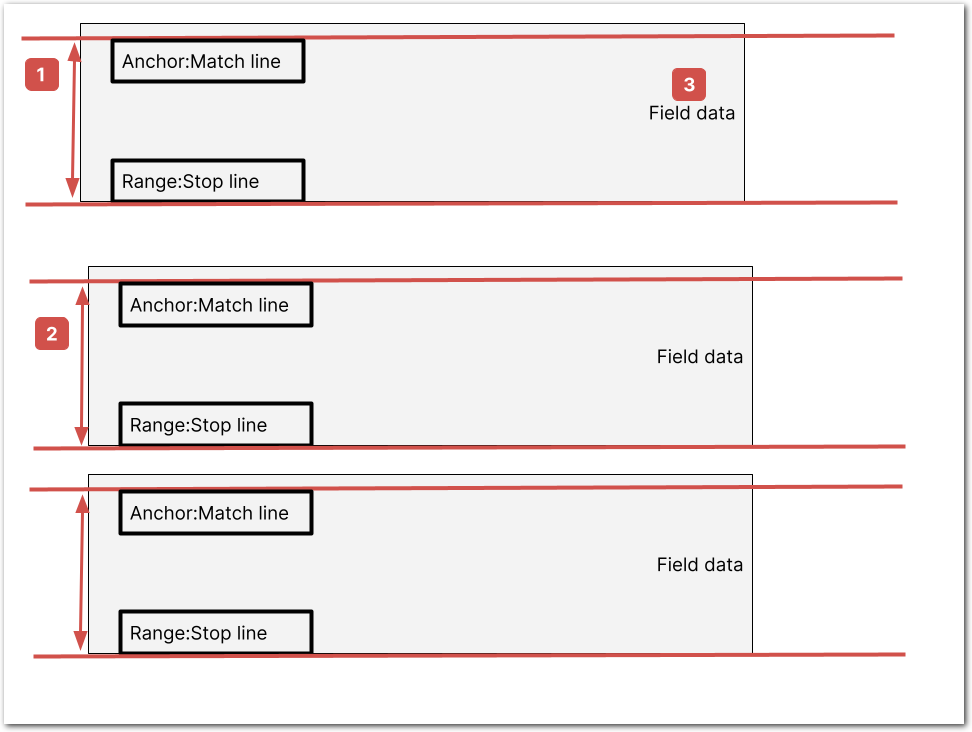 Vertical sections:
The following image shows vertical sections. For more information, see the following Parameters section, and see Section nuances.
Vertical sections:
The following image shows vertical sections. For more information, see the following Parameters section, and see Section nuances.
 Tip: To extract repeated vertical section groups, nest them in a parent section group. For an example, see Advanced: nested columns example.